
This article aims to give a clear representation of the relation between filenames and inodes, to explain what is an inode and which differences exist between a hard link and a symbolic link.
2.1 Filename as Hardlink to Inode
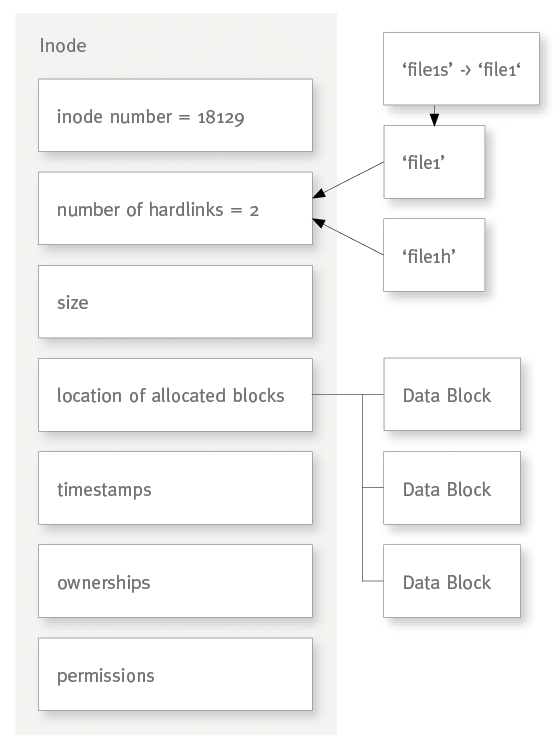
On ext3 and ext4 (and some other filesystems) a file is stored internally as an inode and a filename is just a pointer to that inode, called a hardlink.
The bytes stored in a file are called the data itself, while the file metadata represents the filesystem information about that file like timestamps, ownerships and permissions (and other low-level properties like the allocation table of blocks). The inode contains the data as well as the metadata. The command ‘stat’ shows you some of the metadata of a file:
echo "1234" >file1 #create a 4 Bytes file


cp -v file1 file2 #copy the file to a new inode
  `file1' -> `file2'


cp -lv file1 file1h #create a new hardlink to the file
  `file1' -> `file1h'


cp -sv file1 file1s #create a symlink to the file
  `file1' -> `file1s'


stat file* #show information about created files
  File: `file1'
  Size: 5               Blocks: 8          IO Block: 4096   regular file
  Device: 802h/2050d      Inode: 18129       Links: 2
  Access: (0644/-rw-r--r--)  Uid: (    0/    root)   Gid: (    0/    root)
  Access: 2013-07-19 18:29:57.000000000 +0200
  Modify: 2013-07-19 18:29:57.000000000 +0200
  Change: 2013-07-19 18:29:57.000000000 +0200
  Birth: -
  File: `file1h'
  Size: 5               Blocks: 8          IO Block: 4096   regular file
  Device: 802h/2050d      Inode: 18129       Links: 2
  Access: (0644/-rw-r--r--)  Uid: (    0/    root)   Gid: (    0/    root)
  Access: 2013-07-19 18:29:57.000000000 +0200
  Modify: 2013-07-19 18:29:57.000000000 +0200
  Change: 2013-07-19 18:29:57.000000000 +0200
  Birth: -
  File: `file1s' -> `file1'
  Size: 5               Blocks: 0          IO Block: 4096   symbolic link
  Device: 802h/2050d      Inode: 18131       Links: 1
  Access: (0777/lrwxrwxrwx)  Uid: (    0/    root)   Gid: (    0/    root)
  Access: 2013-07-19 18:29:57.000000000 +0200
  Modify: 2013-07-19 18:29:57.000000000 +0200
  Change: 2013-07-19 18:29:57.000000000 +0200
  Birth: -
  File: `file2'
  Size: 5               Blocks: 8          IO Block: 4096   regular file
  Device: 802h/2050d      Inode: 18130       Links: 1
  Access: (0644/-rw-r--r--)  Uid: (    0/    root)   Gid: (    0/    root)
  Access: 2013-07-19 18:29:57.000000000 +0200
  Modify: 2013-07-19 18:29:57.000000000 +0200
  Change: 2013-07-19 18:29:57.000000000 +0200
  Birth: -
As you can see, ‘cp -lv file1 file1h’ is just creating a new hardlink on the same inode 18129, file1 and file1h are two filenames but actually a single file with a single set of timestamps, ownerships and permissions (cf. File Ownerships, Permissions and Timestamps).
‘cp -v file1 file2′ on the other side is creating a hardlink to another inode and is then duplicating all data blocks, i.e. a new file.
And ‘cp -sv file1 file1s’ is creating a symlink pointing to the ‘file1′ filename.
To detect inodes with multiple hardlinks you can use for example ‘fdupes -Hr /bin’:
#find duplicate hardlinks (with an 'awk' command to keep only duplicate lines):
fdupes -Hrq /bin/ | xargs -l ls -i | awk '{L[$1][++I[$1]]=$0};END{for(i in I)if(I[i]>1)for(l in L[i])print L[i][l]}'
  233900 /bin/bzip2
  233900 /bin/bunzip2
  233900 /bin/bzcat
  229391 /bin/uncompress
  229391 /bin/gunzip
  229394 /bin/nisdomainname
  229394 /bin/ypdomainname
  229394 /bin/dnsdomainname
  229394 /bin/domainname
You can also use ‘find’:
find /bin/ -inum $(ls -i /bin/bzip2 | awk '{print $1}')
  /bin/bzip2
  /bin/bunzip2
  /bin/bzcat


find /bin/ -samefile /bin/bzip2
  /bin/bzip2
  /bin/bunzip2
  /bin/bzcat


#find duplicate hardlinks:
  find /bin/ -xdev -ls 2>/dev/null |   awk '{
    i = $1; sub(/[^/]*\.?\//, "./")
    inum[i] = inum[i] ? inum[i] SUBSEP $0 : $0
  }
  END {
    for (I in inum) {
      if ((n = split(inum[I], files, SUBSEP)) > 1) {
        print "hardlinks to inode",I":"
        for (i = 1; i <= n; i++)
          print files[i]
        }
      }
    }'
  hardlinks to inode 229394:
  ./bin/ypdomainname
  ./bin/dnsdomainname
  ./bin/domainname
  ./bin/nisdomainname
  hardlinks to inode 233900:
  ./bin/bzip2
  ./bin/bunzip2
  ./bin/bzcat
  hardlinks to inode 229391:
  ./bin/uncompress
  ./bin/gunzip


#find symlinks:
find /bin/ -type l -ls
  70855    0 lrwxrwxrwx   1 root     root            4 Dec 30  2012 /bin/rbash -> bash
  229429    0 lrwxrwxrwx   1 root     root           20 May 25  2012 /bin/mt -> /etc/alternatives/mt
  234771    0 lrwxrwxrwx   1 root     root           24 Jul 17 09:58 /bin/netcat -> /etc/alternatives/netcat
  234837    0 lrwxrwxrwx   1 root     root            6 Jul 17 13:50 /bin/bzcmp -> bzdiff
  234984    0 lrwxrwxrwx   1 root     root            6 Jul 17 13:56 /bin/open -> openvt
  234253    0 lrwxrwxrwx   1 root     root            4 Jul 17 13:58 /bin/lsmod -> kmod
  229406    0 lrwxrwxrwx   1 root     root           14 Jul 17 09:50 /bin/pidof -> /sbin/killall5
  233711    0 lrwxrwxrwx   1 root     root            8 Jun 10  2012 /bin/lessfile -> lesspipe
  234843    0 lrwxrwxrwx   1 root     root            6 Jul 17 13:50 /bin/bzless -> bzmore
  234839    0 lrwxrwxrwx   1 root     root            6 Jul 17 13:50 /bin/bzegrep -> bzgrep
  558132    0 lrwxrwxrwx   1 root     root            4 Jun 22  2012 /bin/rnano -> nano
  234769    0 lrwxrwxrwx   1 root     root           20 Jul 17 09:58 /bin/nc -> /etc/alternatives/nc
  229379    0 lrwxrwxrwx   1 root     root            4 Jul 17 09:50 /bin/sh -> dash
  234841    0 lrwxrwxrwx   1 root     root            6 Jul 17 13:50 /bin/bzfgrep -> bzgrep
2.2 Differences between hardlinks and symlinks
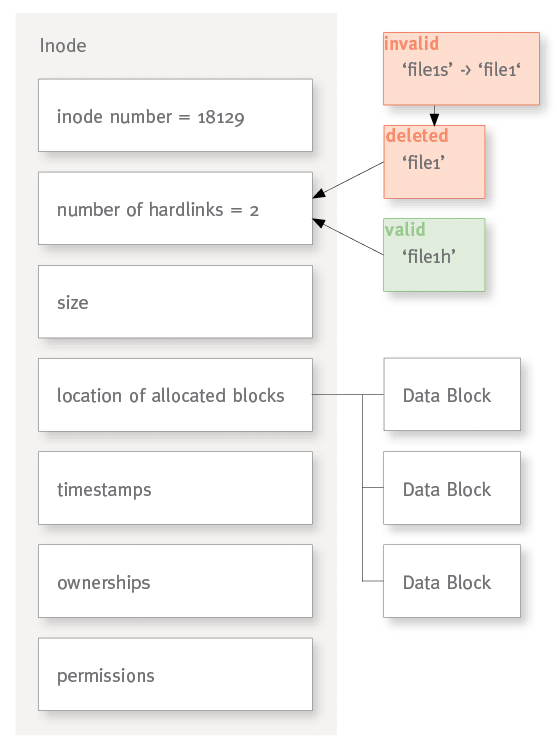
When you delete a file you actually remove the filename from the directory index and remove one link to the inode (reminder: a filename is a pointer/hardlink to an inode).
The inode is only marked as deleted when there is no hardlink left (and when all processes have closed their file descriptors, which count as links, too, see in /proc/$$/fd/).
When you modify the file it affects all filenames that are linked to it.
A hardlink is similar to a symlink (symbolic link, pointer to a filename with a relative or absolute path) but is completely transparent for the applications. For example moving, renaming, or deleting a file does not affect a hardlink pointing to its inode though it breaks a symlink pointing to its filename; several hardlinks to the same inode are indistinguishable. In the above example the new hardlink ‘file1h’ was identical to ‘file1′ and deleting ‘file1′ would not affect ‘file1h’; on the other side it would make the symlink ‘file1s’ invalid.
Though symlinks may cross filesystem, hardlinks cannot point to an inode outside of its filesystem; every filesystem has its own space of inode-id. (cf. http://linuxgazette.net/105/pitcher.html)
Only symlinks can point to directories.
Hardlinks can be very handy to create backups without using new inodes and disk space. (cf. HOWTO – LOCAL AND REMOTE SNAPSHOT BACKUP USING RSYNC WITH HARD LINKS)
Useful commands:
#show duplicates only if also present in folder duplic
fdupes -r folder1/ folder2/ duplic/ | egrep -B1 "^duplic/" | egrep -v "^(--|duplic/)" | while read i; do [ -n "$i" ] && ls -l "$i"; done

#remove one duplicate at the end of each set (remove 'echo' to do it)
fdupes -r folder/ | egrep -B1 "^$" | egrep -v "^(--|)$" | while read i; do [ -n "$i" ] && echo rm -v "$i"; done

#show duplicates sorted by size and number of occurrences:
fdupes -r1 folder/ >/tmp/fdupes.txt
cat /tmp/fdupes.txt | awk '{print length,$0}' | sort -n | cut -d" " -f2- | while read a; do echo $(du -cbs $a | tail -1; echo "$a" | sed -e 's% %\n%g' | wc -l; echo $a); done | sort -n | tail

#remove all occurrences of file1 and its duplicates (remove 'echo' to do it)
fgrep 'folder/path/to/file1' /tmp/fdupes.txt | while read -d " " a; do echo rm -f "$a"; done | less -S

#remove empty folders
find folder/ -depth -type d -empty -exec rmdir \{\} \; | less -S


#create a folder recursive list into a folder.list
(cd /path/to/folder/ && find . -type f -printf "%p %s %T+\n" | sort) >folder.list


#show recursive size of current folder
for i in *; do echo -n "$i"; find "$i" -xdev -type f -ls | awk 'BEGIN {sum=0}; {sum+=$7}; END {printf ("%.20g\n", sum)}'; done | sort -nk2 | column -t


#compare folders
sdiff -sdbB <(cd folder1/ && find . -type f -printf "%p %T+ %s\n" | sort) <(cd folder2 && find . -type f -printf "%p %T+ %s\n" | sort) | less -